These two tools are very useful on the iPhone. Do install them as you will need them if you need to be able to transfer files from your computer to the iphone esp copying Summerboard themes.
SSH - You can install OpenSSH from Installer. I also recommend that you install BossPrefs as well as this will allow you to turn on/off SSH (most of the time, you want if OFF !!)
WinSCP - This is to be install on your PC/Notebook. You can download this from : http://winscp.net/eng/download.php
What is WinSCP?
WinSCP (Windows Secure copy) is an open source SFTP and FTP client for Microsoft Windows. Its main function is secure file transfer between a local and a remote computer. Beyond this, WinSCP offers basic file manager functionality. For secure transfers, it uses Secure Shell (SSH) and supports the legacy SCP protocol in addition to SFTP.
(Definition taken from http://en.wikipedia.org/wiki/WinSCP)
Basically, the interface is like windows explorer whereby on the left panel, it's the directories you have on the iPhone, on the right are the files available in the parent/sub directories. Looks something like the picture below
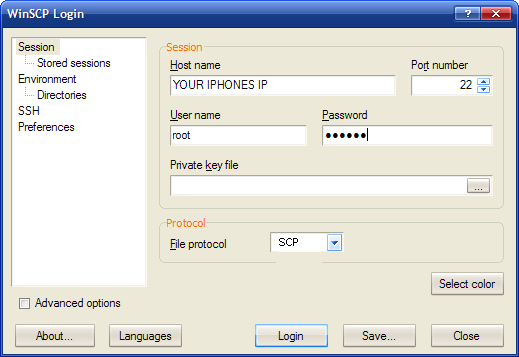
How do you do a login to your iPhone with WinSCP
Friday, April 4, 2008
SSH and WinSCP

Subscribe to:
Post Comments (Atom)


1 comment:
Hi,
I cant seem to log into my iphone. i used the passwords alpine and dottie. But when I do it either says "connection timed out" or "connection refused"
please help.
Post a Comment